
Quick answer
Use broad shapes, thick outlines, and one main subject for newer or shorter coloring sessions. Add more subjects, smaller regions, patterns, and background detail as the child asks for a longer challenge. Offer two or three choices and let the child's interest and comfort override the age label.
- Age bands are starting points, not developmental tests or ability labels.
- Region size and line density affect difficulty more than the subject itself.
- The coloring tool and available time can make the same page easier or harder.
- A child leaving the lines is not evidence that the page was wrong or the activity failed.
Judge the page, not only the age label
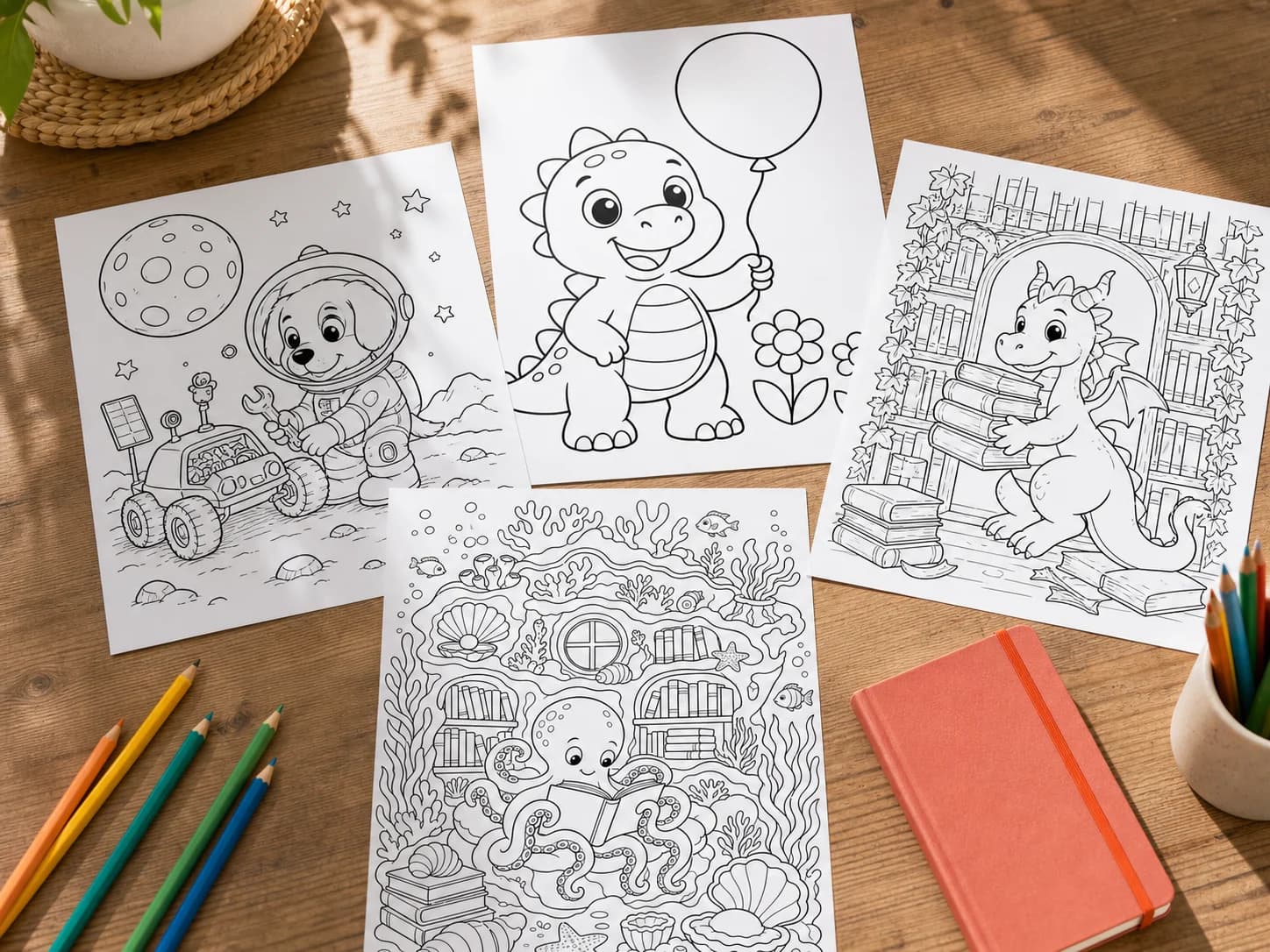
Difficulty comes from several visual demands happening together. A page can feature a favorite dinosaur and still feel hard if the dinosaur is small, surrounded by patterned scenery, and divided into many narrow regions. Another dinosaur page may be easy to enter because it has a large body, bold outline, and only two flowers beside it.
Look at the page from arm's length. If one main subject is obvious and the open areas are easy to find, the page will usually be easier to start. If the eye moves through many equally detailed objects with no clear focal point, the page asks for more visual scanning and planning.
| Page feature | Easier starting point | More involved challenge |
|---|---|---|
| Main subjects | One large subject | Several overlapping subjects |
| Coloring regions | Large, broad, closed areas | Many narrow or tiny areas |
| Outline | Thick, clear, separated lines | Fine lines, patterns, and close intersections |
| Background | Blank or a few simple shapes | A full setting with layered objects |
| Composition | Clear focal point and open margin | Detail distributed across the full page |
| Choice load | Two or three obvious areas to begin | Many equally detailed starting points |
Use age bands as broad starting points
The ranges below describe common page features, not what a child should be able to do. A child may prefer a different level because of interest, vision, motor access, fatigue, experience, or the coloring tool available that day. Offer choice without announcing that one page is for babies or another is for advanced children.
| Starting range | Page features to try | Good moment for it |
|---|---|---|
| About ages 2-4 | One large subject, very thick lines, huge open regions, almost no background | First tries, broad crayons, short shared activity |
| About ages 4-6 | Two or three large subjects, bold lines, simple setting, broad regions | Independent choice, classroom center, add-one-detail prompt |
| About ages 7-9 | Complete scene, several subjects, medium-weight lines, clear background discoveries | Longer quiet time, themed project, pencils or markers |
| About ages 10 and up | Full-page composition, fine clean lines, patterns, many small regions | Patient sessions, shading, detailed keepsake work |
Match the page to the time and material
Difficulty changes when the same page meets a different tool. A broad crayon covers space quickly but feels awkward inside tiny patterns. A sharpened colored pencil can reach those patterns but takes longer to fill a large background. Markers move quickly, yet narrow neighboring regions demand more control and may bleed through light paper.
| Situation | Choose more of | Choose less of |
|---|---|---|
| Five-minute wait | One subject, broad regions, obvious stopping point | Full backgrounds and repeated patterns |
| Classroom center | Several page choices and clean closed shapes | Materials that require long setup or drying |
| Travel folder | Sturdy outlines and a page that can continue later | Tiny loose pieces or an all-or-nothing composition |
| Long quiet afternoon | Detailed scenes, patterns, discoveries, room for shading | A page that will feel finished after only a few strokes |
| Broad crayons | Large spaces and bold lines | Narrow stripes and tiny repeated motifs |
| Colored pencils | Medium or small regions with some surface texture | Only huge empty areas unless the child likes layering |
Watch how the child responds
The best feedback comes from the child using the page. Notice whether they can find a place to begin, whether the tool fits the spaces, and whether they stay engaged long enough for the activity they wanted. Do not measure success by complete coverage or staying inside every outline.
The page may be too demanding right now when
The child repeatedly asks where to start, cannot find open regions with the available tool, abandons the page immediately despite liking the subject, or says the lines feel crowded. Offer a simpler version, crop to one subject, use a broader tool, or invite them to color only one chosen section.
The child may want more complexity when
They finish quickly and ask what else to add, create patterns inside broad spaces, add a detailed background, ask for more objects, or return to intricate pages by choice. Move up one level or keep the same page structure and add an open-ended prompt.
Make an existing page easier or more challenging
You do not always need a new printable. Change the invitation, crop, material, or stopping point to make the page fit the moment.
| To make it easier to enter | To add a longer challenge |
|---|---|
| Cover part of the page and reveal one section at a time | Create a limited palette and repeat it across the page |
| Choose one main subject and leave the background blank | Add a setting outside the printed frame |
| Use broad crayons or washable markers | Use pencils for shading, texture, or layered color |
| Set a five-minute stopping point | Return across several sessions in a dedicated folder |
| Print the subject larger when the file allows | Add patterns inside selected broad regions |
| Color together and let the child choose who does each region | Write a title, caption, or short story on the back |
Support access without turning coloring into a test
Children vary in vision, grip, movement, sensory preferences, and comfort with paper activities. A page choice cannot diagnose those differences, and coloring should not be used as a test of readiness or neatness. If a child already uses supports recommended by a family, teacher, or occupational therapist, carry those supports into coloring time.
- Offer larger print, stronger contrast, or fewer visible choices when visual scanning is tiring.
- Use a clipboard, non-slip mat, adaptive grip, larger crayon, or supported seating when those tools help access.
- Allow breaks, partial completion, shared coloring, or a different creative activity.
- Avoid correcting color choices or requiring the printed example to be copied.
- Ask what would make the activity easier instead of assuming why a child stopped.
Apply the same check to a custom page
If you want a custom subject, ColorKind is a free-to-try app that offers Little, Simple, Detailed, and Advanced settings before you choose an idea or photo. Start with the closest visual description, not the label that seems to match a birthday. Generate one page, then look at its region size and density before printing several copies.
For a text idea, keep the subject request short enough that the chosen detail level can do its job. A simple request such as a friendly dinosaur holding a balloon gives a Little page room for one bold subject. Asking for six dinosaurs, a castle, a parade, and a patterned sky creates competing detail even when the lower setting tries to simplify it.
For a photo, start one level simpler when the source has several people, patterned clothing, or a busy setting. The photo guide explains how cropping and subject separation can improve the result before the detail level is increased.
Frequently asked questions
What coloring pages are best for a two-year-old?
Start with one large familiar subject, very thick outlines, huge open areas, and broad washable crayons. Treat the activity as exploration rather than expecting complete coverage or coloring inside the lines.
When should a child move to detailed coloring pages?
Move when the child asks for more to discover, adds their own patterns or backgrounds, or chooses to spend longer with a page. There is no required age or milestone for switching.
Is coloring outside the lines a problem?
No. Printed outlines are visual options, not a test. Choose a page and tool that feel comfortable, but do not use line accuracy to judge creativity or development.
How can I simplify a page I already printed?
Cover part of it, choose only the main subject, use a broad tool, set a short stopping point, or color together. Leaving the rest blank is a complete and valid choice.